# 9. Oferta Ativa


# 9.1 OFERTA ATIVA - DOMMUS PROSPECTA

 **OFERTA ATIVA**

A **Oferta Ativa** é um recurso do sistema Dommus que distribui **leads aleatoriamente** entre os **corretores qualificados**, garantindo agilidade e imparcialidade no acesso às oportunidades.

**Como acessar**<span class="heading-anchor-wrapper" role="presentation"><button aria-hidden="true" class="cc-wf6gg8" data-testid="anchor-button" type="button"><span aria-label="Copiar" class="_1e0c1o8l _vchhusvi _1o9zidpf _vwz4kb7n _y4ti1igz _bozg1mb9 _12va18uv _jcxd1r8n" role="img"><svg class="_1reo15vq _18m915vq _syaz1r31 _lcxvglyw _s7n4yfq0 _vc881r31 _1bsbpxbi _4t3ipxbi" fill="none" role="presentation" viewbox="0 0 16 16"><path clip-rule="evenodd" d="M8.22 2.22a3.932 3.932 0 1 1 5.56 5.56l-2.25 2.25-1.06-1.06 2.25-2.25a2.432 2.432 0 0 0-3.44-3.44L7.03 5.53 5.97 4.47zm3.06 3.56-5.5 5.5-1.06-1.06 5.5-5.5zM2.22 8.22l2.25-2.25 1.06 1.06-2.25 2.25a2.432 2.432 0 0 0 3.44 3.44l2.25-2.25 1.06 1.06-2.25 2.25a3.932 3.932 0 1 1-5.56-5.56" fill="currentcolor" fill-rule="evenodd"></path></svg></span></button></span><span class="_ca0qidpf _u5f3idpf _n3tdidpf _19bvidpf _19itidpf _1reo15vq _18m915vq _1bsbt94y _4t3it94y _kqswstnw _ogto7mnp _uiztglyw _o5721q9c" data-testid="visually-hidden-heading-anchor"><span class="heading-anchor-wrapper" role="presentation"><button aria-hidden="false" aria-label="Copiar link para cabeçalho" aria-labelledby="Como-acessar" class="cc-wf6gg8" data-testid="anchor-button" tabindex="-1" type="button"><span aria-label="Copiar" class="_1e0c1o8l _vchhusvi _1o9zidpf _vwz4kb7n _y4ti1igz _bozg1mb9 _12va18uv _jcxd1r8n" role="img"><svg class="_1reo15vq _18m915vq _syaz1r31 _lcxvglyw _s7n4yfq0 _vc881r31 _1bsbpxbi _4t3ipxbi" fill="none" role="presentation" viewbox="0 0 16 16"><path clip-rule="evenodd" d="M8.22 2.22a3.932 3.932 0 1 1 5.56 5.56l-2.25 2.25-1.06-1.06 2.25-2.25a2.432 2.432 0 0 0-3.44-3.44L7.03 5.53 5.97 4.47zm3.06 3.56-5.5 5.5-1.06-1.06 5.5-5.5zM2.22 8.22l2.25-2.25 1.06 1.06-2.25 2.25a2.432 2.432 0 0 0 3.44 3.44l2.25-2.25 1.06 1.06-2.25 2.25a3.932 3.932 0 1 1-5.56-5.56" fill="currentcolor" fill-rule="evenodd"></path></svg></span></button></span></span>

Para acessar as Ofertas Ativas:

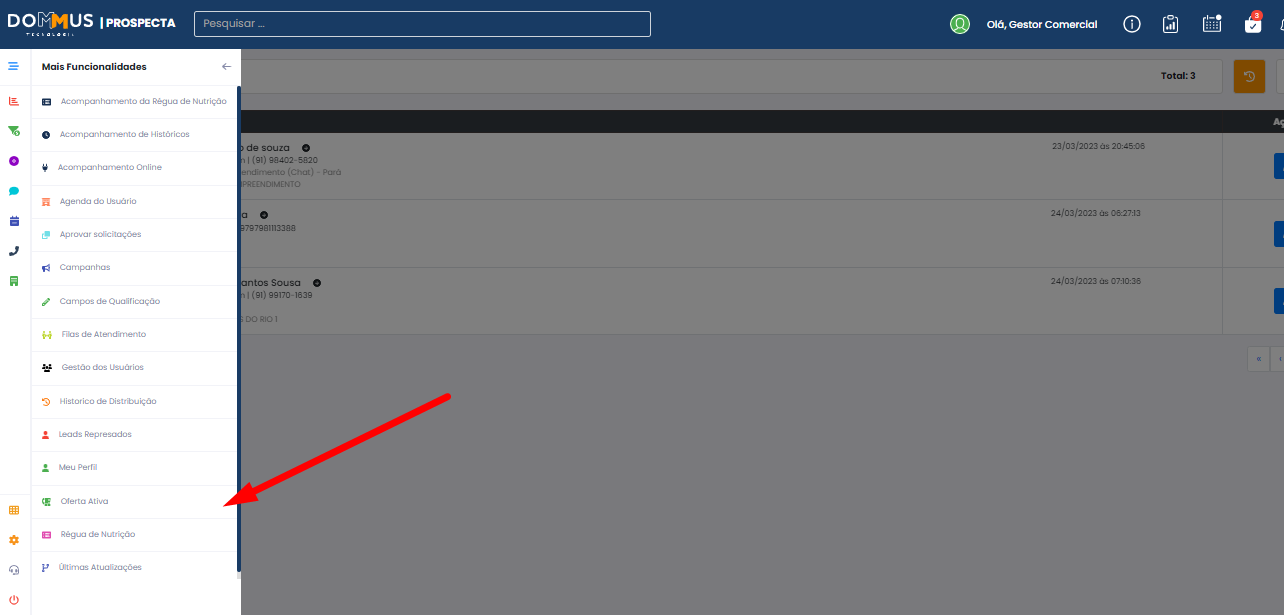
1. Vá até o menu **Mais Funcionalidades**.
2. Clique em **Oferta Ativa**.

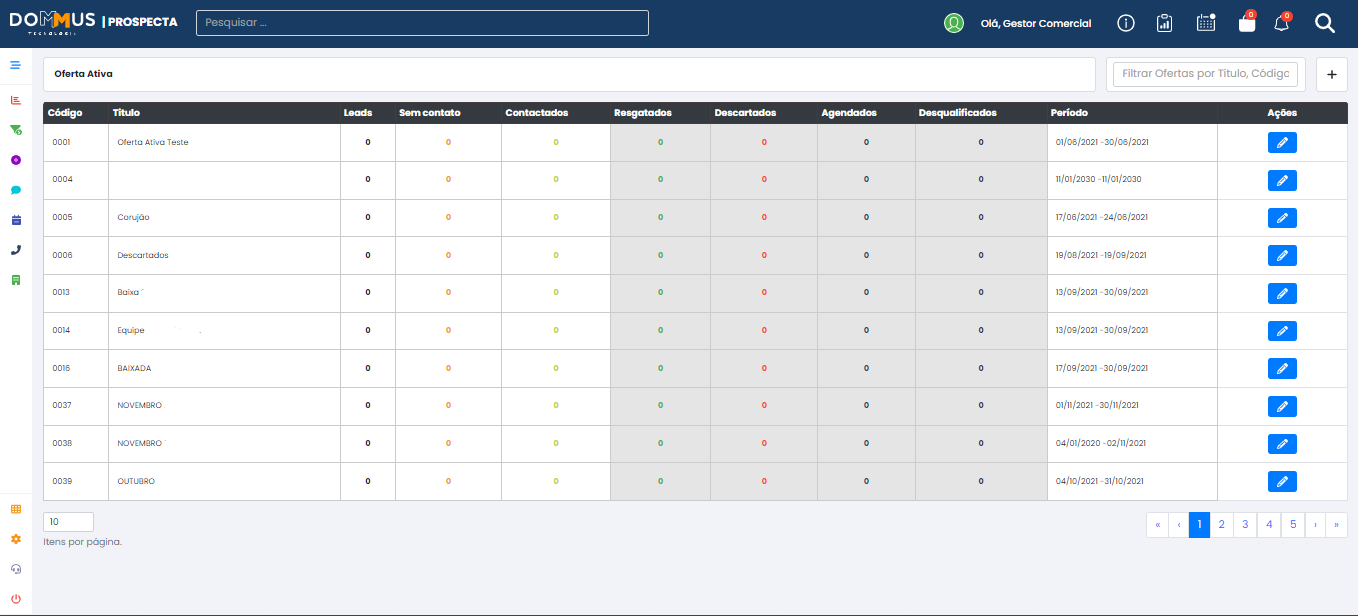
O sistema exibirá todas as **ofertas ativas** cadastradas.

[![image.png](https://duvida.dommus.com.br/uploads/images/gallery/2025-07/scaled-1680-/GkRimage.png)](https://duvida.dommus.com.br/uploads/images/gallery/2025-07/GkRimage.png)
[![image.png](https://duvida.dommus.com.br/uploads/images/gallery/2025-07/scaled-1680-/4S8image.png)](https://duvida.dommus.com.br/uploads/images/gallery/2025-07/4S8image.png)
**Como cadastrar uma nova Oferta Ativa**<span class="heading-anchor-wrapper" role="presentation"><button aria-hidden="true" class="cc-wf6gg8" data-testid="anchor-button" type="button"><span aria-label="Copiar" class="_1e0c1o8l _vchhusvi _1o9zidpf _vwz4kb7n _y4ti1igz _bozg1mb9 _12va18uv _jcxd1r8n" role="img"><svg class="_1reo15vq _18m915vq _syaz1r31 _lcxvglyw _s7n4yfq0 _vc881r31 _1bsbpxbi _4t3ipxbi" fill="none" role="presentation" viewbox="0 0 16 16"><path clip-rule="evenodd" d="M8.22 2.22a3.932 3.932 0 1 1 5.56 5.56l-2.25 2.25-1.06-1.06 2.25-2.25a2.432 2.432 0 0 0-3.44-3.44L7.03 5.53 5.97 4.47zm3.06 3.56-5.5 5.5-1.06-1.06 5.5-5.5zM2.22 8.22l2.25-2.25 1.06 1.06-2.25 2.25a2.432 2.432 0 0 0 3.44 3.44l2.25-2.25 1.06 1.06-2.25 2.25a3.932 3.932 0 1 1-5.56-5.56" fill="currentcolor" fill-rule="evenodd"></path></svg></span></button></span><span class="_ca0qidpf _u5f3idpf _n3tdidpf _19bvidpf _19itidpf _1reo15vq _18m915vq _1bsbt94y _4t3it94y _kqswstnw _ogto7mnp _uiztglyw _o5721q9c" data-testid="visually-hidden-heading-anchor"><span class="heading-anchor-wrapper" role="presentation"><button aria-hidden="false" aria-label="Copiar link para cabeçalho" aria-labelledby="Como-cadastrar-uma-nova-Oferta-Ativa" class="cc-wf6gg8" data-testid="anchor-button" tabindex="-1" type="button"><span aria-label="Copiar" class="_1e0c1o8l _vchhusvi _1o9zidpf _vwz4kb7n _y4ti1igz _bozg1mb9 _12va18uv _jcxd1r8n" role="img"><svg class="_1reo15vq _18m915vq _syaz1r31 _lcxvglyw _s7n4yfq0 _vc881r31 _1bsbpxbi _4t3ipxbi" fill="none" role="presentation" viewbox="0 0 16 16"><path clip-rule="evenodd" d="M8.22 2.22a3.932 3.932 0 1 1 5.56 5.56l-2.25 2.25-1.06-1.06 2.25-2.25a2.432 2.432 0 0 0-3.44-3.44L7.03 5.53 5.97 4.47zm3.06 3.56-5.5 5.5-1.06-1.06 5.5-5.5zM2.22 8.22l2.25-2.25 1.06 1.06-2.25 2.25a2.432 2.432 0 0 0 3.44 3.44l2.25-2.25 1.06 1.06-2.25 2.25a3.932 3.932 0 1 1-5.56-5.56" fill="currentcolor" fill-rule="evenodd"></path></svg></span></button></span></span>

1. Clique no ícone de **adição** no canto superior direito da tela.

[![image.png](https://duvida.dommus.com.br/uploads/images/gallery/2025-07/scaled-1680-/jOAimage.png)](https://duvida.dommus.com.br/uploads/images/gallery/2025-07/jOAimage.png)

2. Uma nova janela será exibida com os seguintes campos:

- **Título da Oferta Ativa**
- **Data de início e data de término**
- **Opção para bloquear o acesso dos corretores fora do período da oferta**

[![image.png](https://duvida.dommus.com.br/uploads/images/gallery/2025-07/scaled-1680-/lbeimage.png)](https://duvida.dommus.com.br/uploads/images/gallery/2025-07/lbeimage.png)
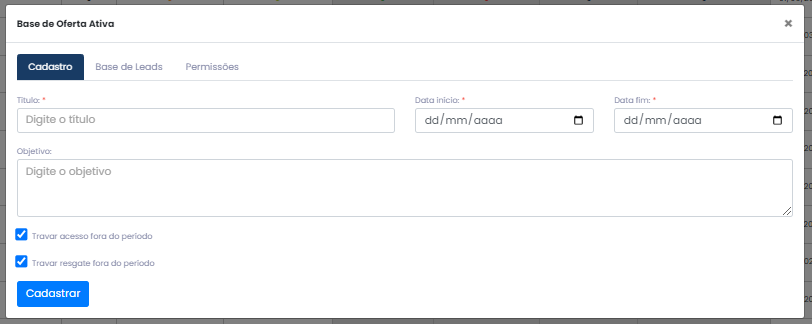
Após preencher as informações, clique em **Cadastrar**. O sistema então redirecionará você para a próxima etapa: a **importação de leads**.

[![image.png](https://duvida.dommus.com.br/uploads/images/gallery/2025-07/scaled-1680-/ENHimage.png)](https://duvida.dommus.com.br/uploads/images/gallery/2025-07/ENHimage.png)
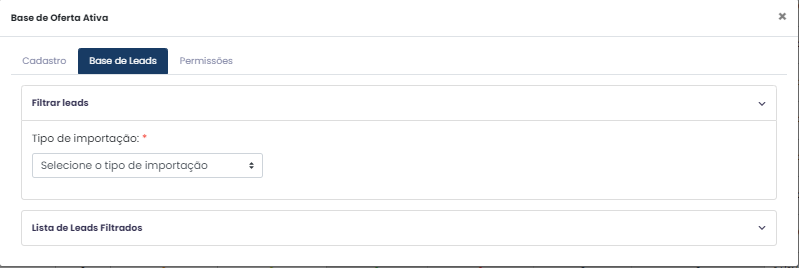
**Importando Leads**<span class="heading-anchor-wrapper" role="presentation"><button aria-hidden="true" class="cc-wf6gg8" data-testid="anchor-button" type="button"><span aria-label="Copiar" class="_1e0c1o8l _vchhusvi _1o9zidpf _vwz4kb7n _y4ti1igz _bozg1mb9 _12va18uv _jcxd1r8n" role="img"><svg class="_1reo15vq _18m915vq _syaz1r31 _lcxvglyw _s7n4yfq0 _vc881r31 _1bsbpxbi _4t3ipxbi" fill="none" role="presentation" viewbox="0 0 16 16"><path clip-rule="evenodd" d="M8.22 2.22a3.932 3.932 0 1 1 5.56 5.56l-2.25 2.25-1.06-1.06 2.25-2.25a2.432 2.432 0 0 0-3.44-3.44L7.03 5.53 5.97 4.47zm3.06 3.56-5.5 5.5-1.06-1.06 5.5-5.5zM2.22 8.22l2.25-2.25 1.06 1.06-2.25 2.25a2.432 2.432 0 0 0 3.44 3.44l2.25-2.25 1.06 1.06-2.25 2.25a3.932 3.932 0 1 1-5.56-5.56" fill="currentcolor" fill-rule="evenodd"></path></svg></span></button></span><span class="_ca0qidpf _u5f3idpf _n3tdidpf _19bvidpf _19itidpf _1reo15vq _18m915vq _1bsbt94y _4t3it94y _kqswstnw _ogto7mnp _uiztglyw _o5721q9c" data-testid="visually-hidden-heading-anchor"><span class="heading-anchor-wrapper" role="presentation"><button aria-hidden="false" aria-label="Copiar link para cabeçalho" aria-labelledby="Importando-Leads" class="cc-wf6gg8" data-testid="anchor-button" tabindex="-1" type="button"><span aria-label="Copiar" class="_1e0c1o8l _vchhusvi _1o9zidpf _vwz4kb7n _y4ti1igz _bozg1mb9 _12va18uv _jcxd1r8n" role="img"><svg class="_1reo15vq _18m915vq _syaz1r31 _lcxvglyw _s7n4yfq0 _vc881r31 _1bsbpxbi _4t3ipxbi" fill="none" role="presentation" viewbox="0 0 16 16"><path clip-rule="evenodd" d="M8.22 2.22a3.932 3.932 0 1 1 5.56 5.56l-2.25 2.25-1.06-1.06 2.25-2.25a2.432 2.432 0 0 0-3.44-3.44L7.03 5.53 5.97 4.47zm3.06 3.56-5.5 5.5-1.06-1.06 5.5-5.5zM2.22 8.22l2.25-2.25 1.06 1.06-2.25 2.25a2.432 2.432 0 0 0 3.44 3.44l2.25-2.25 1.06 1.06-2.25 2.25a3.932 3.932 0 1 1-5.56-5.56" fill="currentcolor" fill-rule="evenodd"></path></svg></span></button></span></span>

O sistema oferece duas formas de importação:

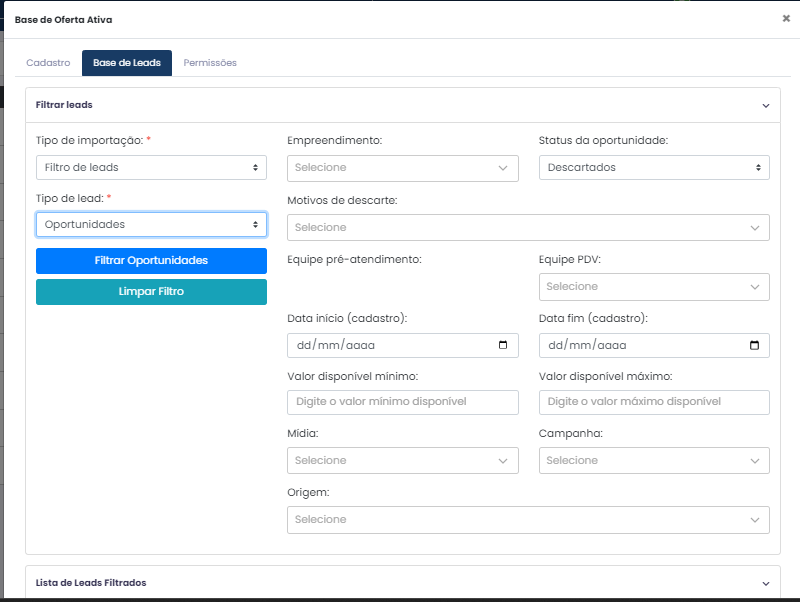
**1. Filtro de Leads**<span class="heading-anchor-wrapper" role="presentation"><button aria-hidden="true" class="cc-wf6gg8" data-testid="anchor-button" type="button"><span aria-label="Copiar" class="_1e0c1o8l _vchhusvi _1o9zidpf _vwz4kb7n _y4ti1igz _bozg1mb9 _12va18uv _jcxd1r8n" role="img"><svg class="_1reo15vq _18m915vq _syaz1r31 _lcxvglyw _s7n4yfq0 _vc881r31 _1bsbpxbi _4t3ipxbi" fill="none" role="presentation" viewbox="0 0 16 16"><path clip-rule="evenodd" d="M8.22 2.22a3.932 3.932 0 1 1 5.56 5.56l-2.25 2.25-1.06-1.06 2.25-2.25a2.432 2.432 0 0 0-3.44-3.44L7.03 5.53 5.97 4.47zm3.06 3.56-5.5 5.5-1.06-1.06 5.5-5.5zM2.22 8.22l2.25-2.25 1.06 1.06-2.25 2.25a2.432 2.432 0 0 0 3.44 3.44l2.25-2.25 1.06 1.06-2.25 2.25a3.932 3.932 0 1 1-5.56-5.56" fill="currentcolor" fill-rule="evenodd"></path></svg></span></button></span><span class="_ca0qidpf _u5f3idpf _n3tdidpf _19bvidpf _19itidpf _1reo15vq _18m915vq _1bsbt94y _4t3it94y _kqswstnw _ogto7mnp _uiztglyw _o5721q9c" data-testid="visually-hidden-heading-anchor"><span class="heading-anchor-wrapper" role="presentation"><button aria-hidden="false" aria-label="Copiar link para cabeçalho" aria-labelledby="1.-Filtro-de-Leads" class="cc-wf6gg8" data-testid="anchor-button" tabindex="-1" type="button"><span aria-label="Copiar" class="_1e0c1o8l _vchhusvi _1o9zidpf _vwz4kb7n _y4ti1igz _bozg1mb9 _12va18uv _jcxd1r8n" role="img"><svg class="_1reo15vq _18m915vq _syaz1r31 _lcxvglyw _s7n4yfq0 _vc881r31 _1bsbpxbi _4t3ipxbi" fill="none" role="presentation" viewbox="0 0 16 16"><path clip-rule="evenodd" d="M8.22 2.22a3.932 3.932 0 1 1 5.56 5.56l-2.25 2.25-1.06-1.06 2.25-2.25a2.432 2.432 0 0 0-3.44-3.44L7.03 5.53 5.97 4.47zm3.06 3.56-5.5 5.5-1.06-1.06 5.5-5.5zM2.22 8.22l2.25-2.25 1.06 1.06-2.25 2.25a2.432 2.432 0 0 0 3.44 3.44l2.25-2.25 1.06 1.06-2.25 2.25a3.932 3.932 0 1 1-5.56-5.56" fill="currentcolor" fill-rule="evenodd"></path></svg></span></button></span></span>

- Selecione a opção **Filtro de Leads**.
- Escolha o **Tipo de Lead**:
    
    
    - **Oportunidades**
    - **Não Distribuídos**
- Defina os filtros desejados (como campanha, mídia, empreendimento, entre outros).
- Clique em **Filtrar Oportunidades**.
- Selecione os leads desejados e clique em **Importar**.

[![image.png](https://duvida.dommus.com.br/uploads/images/gallery/2025-07/scaled-1680-/Fakimage.png)](https://duvida.dommus.com.br/uploads/images/gallery/2025-07/Fakimage.png)
**2. CSV**<span class="heading-anchor-wrapper" role="presentation"><button aria-hidden="true" class="cc-wf6gg8" data-testid="anchor-button" type="button"><span aria-label="Copiar" class="_1e0c1o8l _vchhusvi _1o9zidpf _vwz4kb7n _y4ti1igz _bozg1mb9 _12va18uv _jcxd1r8n" role="img"><svg class="_1reo15vq _18m915vq _syaz1r31 _lcxvglyw _s7n4yfq0 _vc881r31 _1bsbpxbi _4t3ipxbi" fill="none" role="presentation" viewbox="0 0 16 16"><path clip-rule="evenodd" d="M8.22 2.22a3.932 3.932 0 1 1 5.56 5.56l-2.25 2.25-1.06-1.06 2.25-2.25a2.432 2.432 0 0 0-3.44-3.44L7.03 5.53 5.97 4.47zm3.06 3.56-5.5 5.5-1.06-1.06 5.5-5.5zM2.22 8.22l2.25-2.25 1.06 1.06-2.25 2.25a2.432 2.432 0 0 0 3.44 3.44l2.25-2.25 1.06 1.06-2.25 2.25a3.932 3.932 0 1 1-5.56-5.56" fill="currentcolor" fill-rule="evenodd"></path></svg></span></button></span><span class="_ca0qidpf _u5f3idpf _n3tdidpf _19bvidpf _19itidpf _1reo15vq _18m915vq _1bsbt94y _4t3it94y _kqswstnw _ogto7mnp _uiztglyw _o5721q9c" data-testid="visually-hidden-heading-anchor"><span class="heading-anchor-wrapper" role="presentation"><button aria-hidden="false" aria-label="Copiar link para cabeçalho" aria-labelledby="2.-CSV" class="cc-wf6gg8" data-testid="anchor-button" tabindex="-1" type="button"><span aria-label="Copiar" class="_1e0c1o8l _vchhusvi _1o9zidpf _vwz4kb7n _y4ti1igz _bozg1mb9 _12va18uv _jcxd1r8n" role="img"><svg class="_1reo15vq _18m915vq _syaz1r31 _lcxvglyw _s7n4yfq0 _vc881r31 _1bsbpxbi _4t3ipxbi" fill="none" role="presentation" viewbox="0 0 16 16"><path clip-rule="evenodd" d="M8.22 2.22a3.932 3.932 0 1 1 5.56 5.56l-2.25 2.25-1.06-1.06 2.25-2.25a2.432 2.432 0 0 0-3.44-3.44L7.03 5.53 5.97 4.47zm3.06 3.56-5.5 5.5-1.06-1.06 5.5-5.5zM2.22 8.22l2.25-2.25 1.06 1.06-2.25 2.25a2.432 2.432 0 0 0 3.44 3.44l2.25-2.25 1.06 1.06-2.25 2.25a3.932 3.932 0 1 1-5.56-5.56" fill="currentcolor" fill-rule="evenodd"></path></svg></span></button></span></span>

- Arraste o arquivo CSV do seu computador para a área indicada.

[![image.png](https://duvida.dommus.com.br/uploads/images/gallery/2025-07/scaled-1680-/kNuimage.png)](https://duvida.dommus.com.br/uploads/images/gallery/2025-07/kNuimage.png)
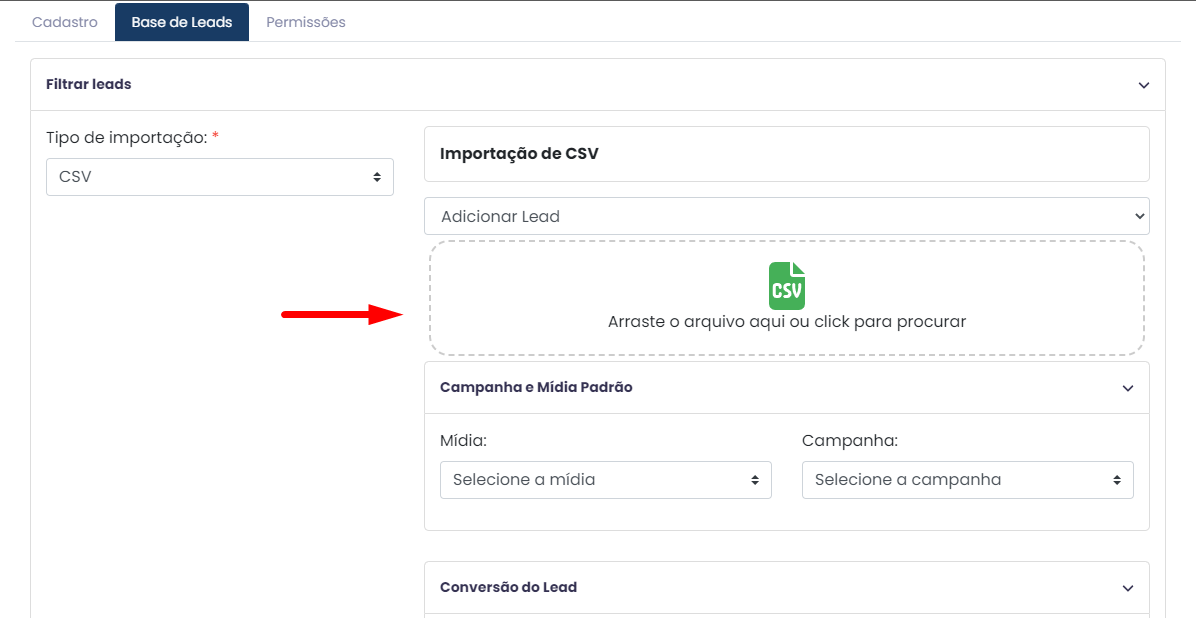
- Selecione a **Campanha e Mídia padrão**.
- Em **Conversão de Lead**, o sistema identificará os campos do seu arquivo.
    
    
    - Ex: Nome do lead, e-mail, telefone.
- Verifique a correspondência de colunas e clique em **Enviar**.

[![image.png](https://duvida.dommus.com.br/uploads/images/gallery/2025-07/scaled-1680-/Uibimage.png)](https://duvida.dommus.com.br/uploads/images/gallery/2025-07/Uibimage.png)
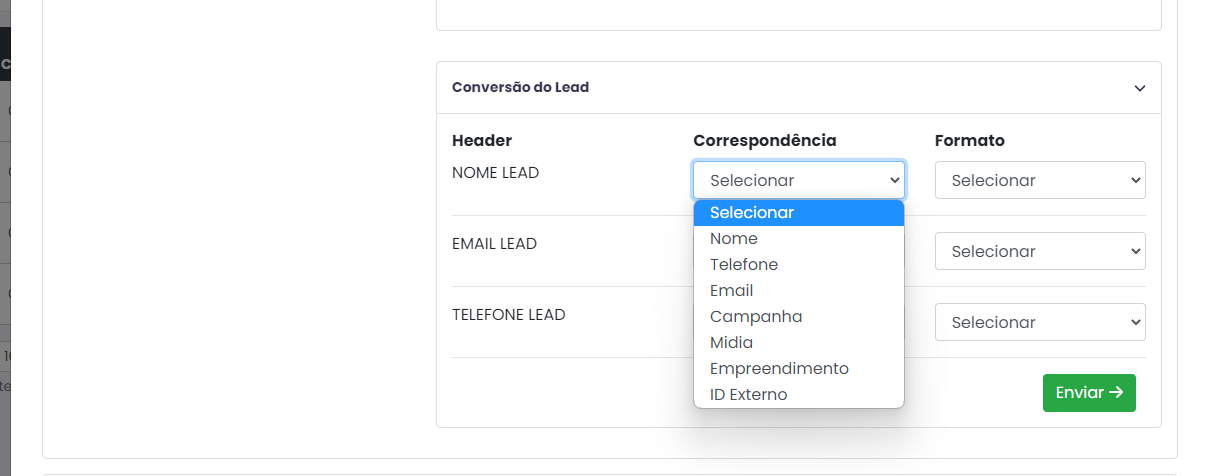
Feito isso, basta selecionar o formato e clicar em enviar.

**Configurando Permissões de Corretores**

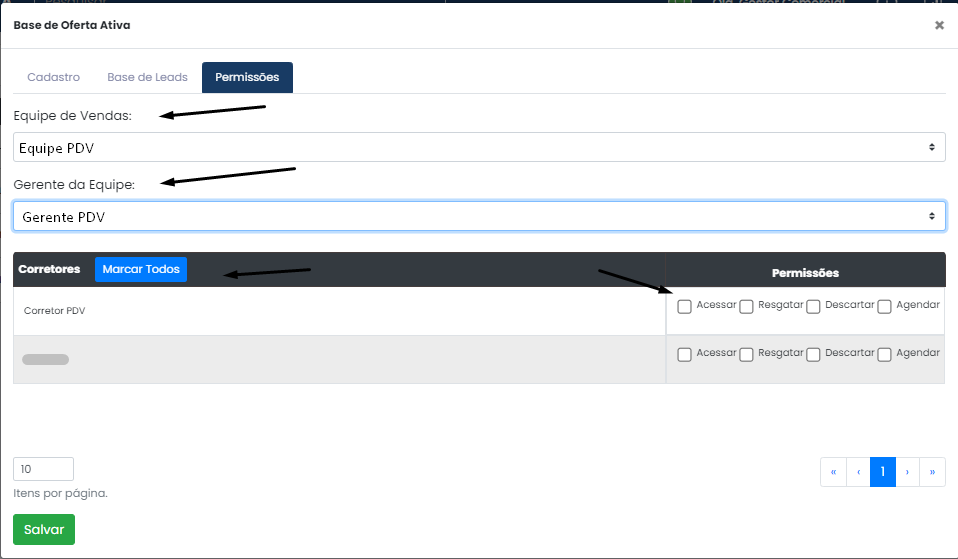
Para definir quais corretores poderão acessar a Oferta Ativa:

1. Clique na aba **Permissões**.
2. Selecione:
    
    
    - A **equipe** vinculada ao corretor
    - O **gerente da equipe**
3. O sistema listará os corretores disponíveis.
4. Para cada corretor, selecione a permissão desejada.
5. Clique em **Salvar**.

[![image.png](https://duvida.dommus.com.br/uploads/images/gallery/2025-07/scaled-1680-/cO0image.png)](https://duvida.dommus.com.br/uploads/images/gallery/2025-07/cO0image.png)
**Acessando e utilizando a Oferta Ativa**<span class="heading-anchor-wrapper" role="presentation"><button aria-hidden="true" class="cc-wf6gg8" data-testid="anchor-button" type="button"><span aria-label="Copiar" class="_1e0c1o8l _vchhusvi _1o9zidpf _vwz4kb7n _y4ti1igz _bozg1mb9 _12va18uv _jcxd1r8n" role="img"><svg class="_1reo15vq _18m915vq _syaz1r31 _lcxvglyw _s7n4yfq0 _vc881r31 _1bsbpxbi _4t3ipxbi" fill="none" role="presentation" viewbox="0 0 16 16"><path clip-rule="evenodd" d="M8.22 2.22a3.932 3.932 0 1 1 5.56 5.56l-2.25 2.25-1.06-1.06 2.25-2.25a2.432 2.432 0 0 0-3.44-3.44L7.03 5.53 5.97 4.47zm3.06 3.56-5.5 5.5-1.06-1.06 5.5-5.5zM2.22 8.22l2.25-2.25 1.06 1.06-2.25 2.25a2.432 2.432 0 0 0 3.44 3.44l2.25-2.25 1.06 1.06-2.25 2.25a3.932 3.932 0 1 1-5.56-5.56" fill="currentcolor" fill-rule="evenodd"></path></svg></span></button></span><span class="_ca0qidpf _u5f3idpf _n3tdidpf _19bvidpf _19itidpf _1reo15vq _18m915vq _1bsbt94y _4t3it94y _kqswstnw _ogto7mnp _uiztglyw _o5721q9c" data-testid="visually-hidden-heading-anchor"><span class="heading-anchor-wrapper" role="presentation"><button aria-hidden="false" aria-label="Copiar link para cabeçalho" aria-labelledby="Acessando-e-utilizando-a-Oferta-Ativa" class="cc-wf6gg8" data-testid="anchor-button" tabindex="-1" type="button"><span aria-label="Copiar" class="_1e0c1o8l _vchhusvi _1o9zidpf _vwz4kb7n _y4ti1igz _bozg1mb9 _12va18uv _jcxd1r8n" role="img"><svg class="_1reo15vq _18m915vq _syaz1r31 _lcxvglyw _s7n4yfq0 _vc881r31 _1bsbpxbi _4t3ipxbi" fill="none" role="presentation" viewbox="0 0 16 16"><path clip-rule="evenodd" d="M8.22 2.22a3.932 3.932 0 1 1 5.56 5.56l-2.25 2.25-1.06-1.06 2.25-2.25a2.432 2.432 0 0 0-3.44-3.44L7.03 5.53 5.97 4.47zm3.06 3.56-5.5 5.5-1.06-1.06 5.5-5.5zM2.22 8.22l2.25-2.25 1.06 1.06-2.25 2.25a2.432 2.432 0 0 0 3.44 3.44l2.25-2.25 1.06 1.06-2.25 2.25a3.932 3.932 0 1 1-5.56-5.56" fill="currentcolor" fill-rule="evenodd"></path></svg></span></button></span></span>

Após cadastrada, a nova Oferta Ativa ficará visível na **última posição da lista**.

- Para acessá-la, clique no menu de opções e em seguida em **Acessar**

[![image.png](https://duvida.dommus.com.br/uploads/images/gallery/2025-07/scaled-1680-/JAUimage.png)](https://duvida.dommus.com.br/uploads/images/gallery/2025-07/JAUimage.png)
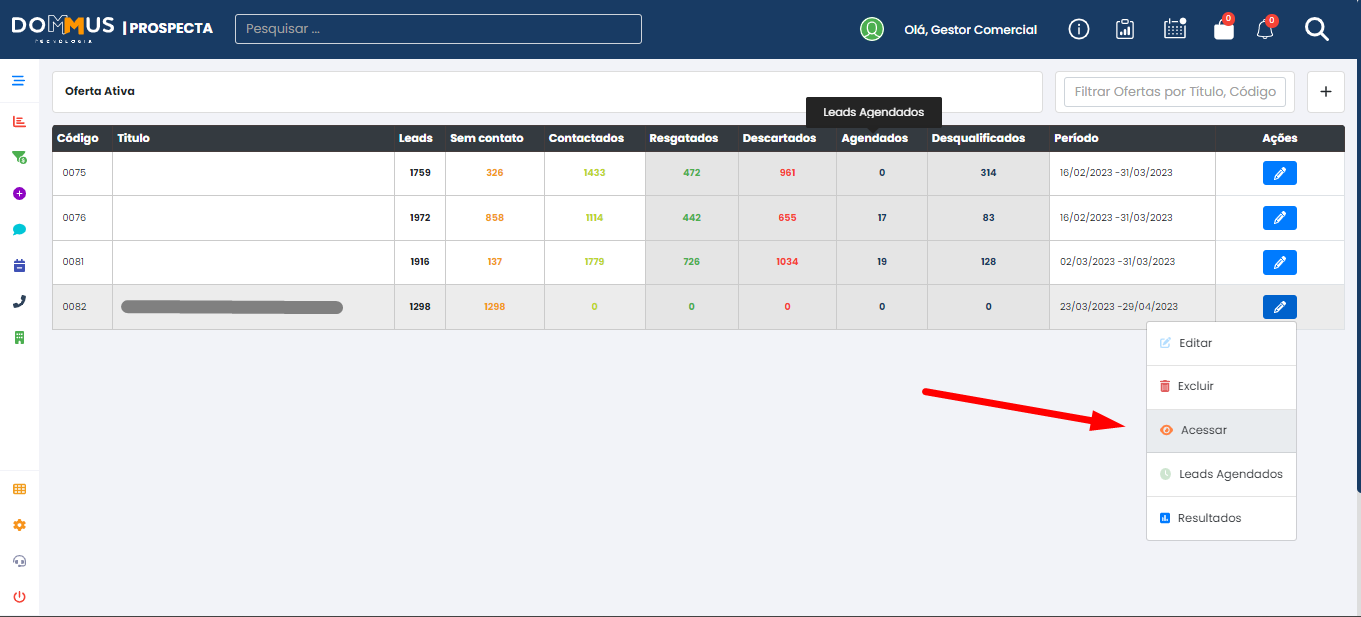
- - O sistema exibirá a lista de leads disponíveis para ação.
    
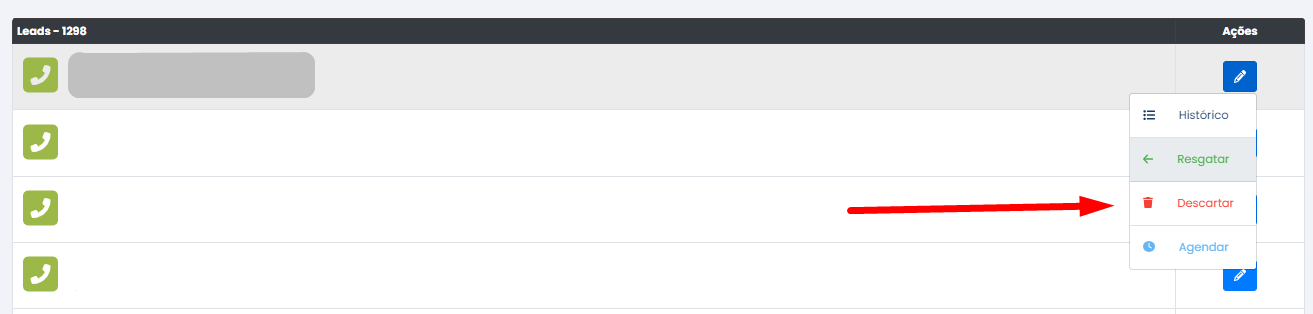
    Para fazer o resgate de um lead, descartar ou agendar, clicamos no ícone localizado à frente do lead e na opção de ‘Resgatar’.

[![image.png](https://duvida.dommus.com.br/uploads/images/gallery/2025-07/scaled-1680-/aysimage.png)](https://duvida.dommus.com.br/uploads/images/gallery/2025-07/aysimage.png)

[![image.png](https://duvida.dommus.com.br/uploads/images/gallery/2025-07/scaled-1680-/4EUimage.png)](https://duvida.dommus.com.br/uploads/images/gallery/2025-07/4EUimage.png)
**Resgatar**: clique no ícone à frente do lead e depois em **Resgatar**.  
Preencha os campos obrigatórios:

- Empreendimento
- Equipe e Gestor de Pré-Atendimento
- Atendente
- Equipe PDV, Gerente PDV e Corretor  
    Clique em **Resgatar Lead**.

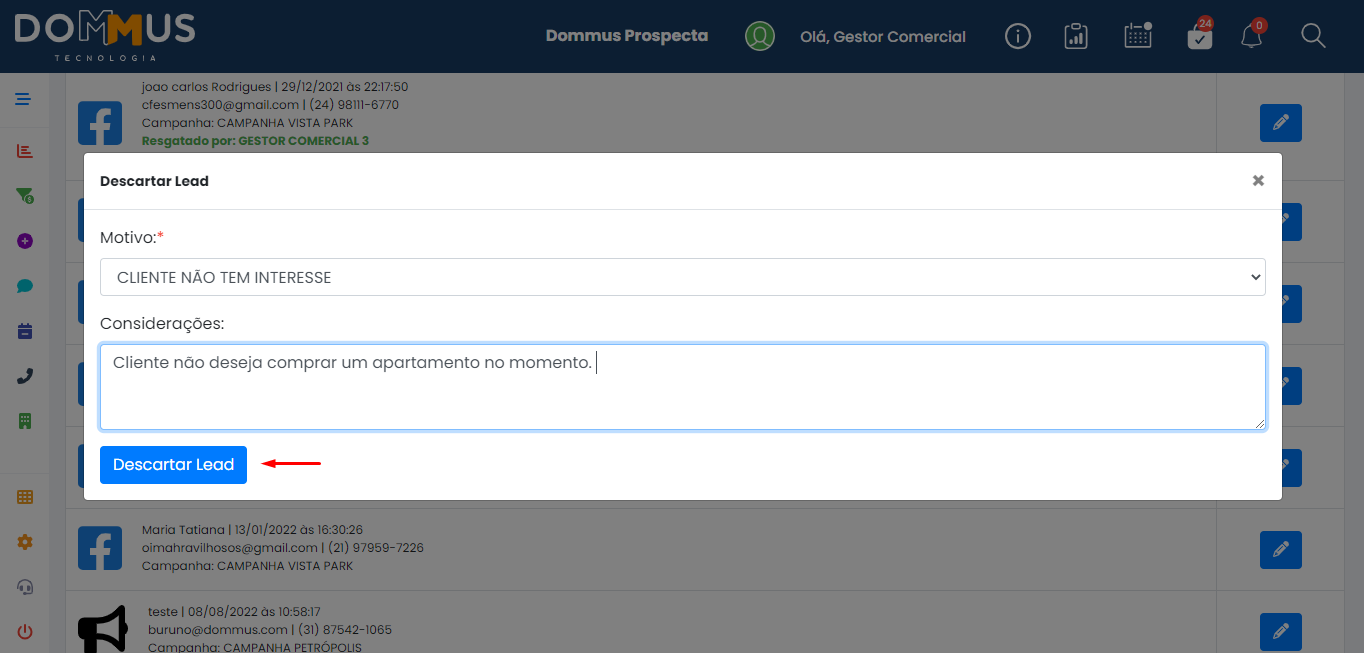
**Descartar**: selecione o motivo do descarte e clique em **Descartar Lea**

[![image.png](https://duvida.dommus.com.br/uploads/images/gallery/2025-07/scaled-1680-/K3oimage.png)](https://duvida.dommus.com.br/uploads/images/gallery/2025-07/K3oimage.png)
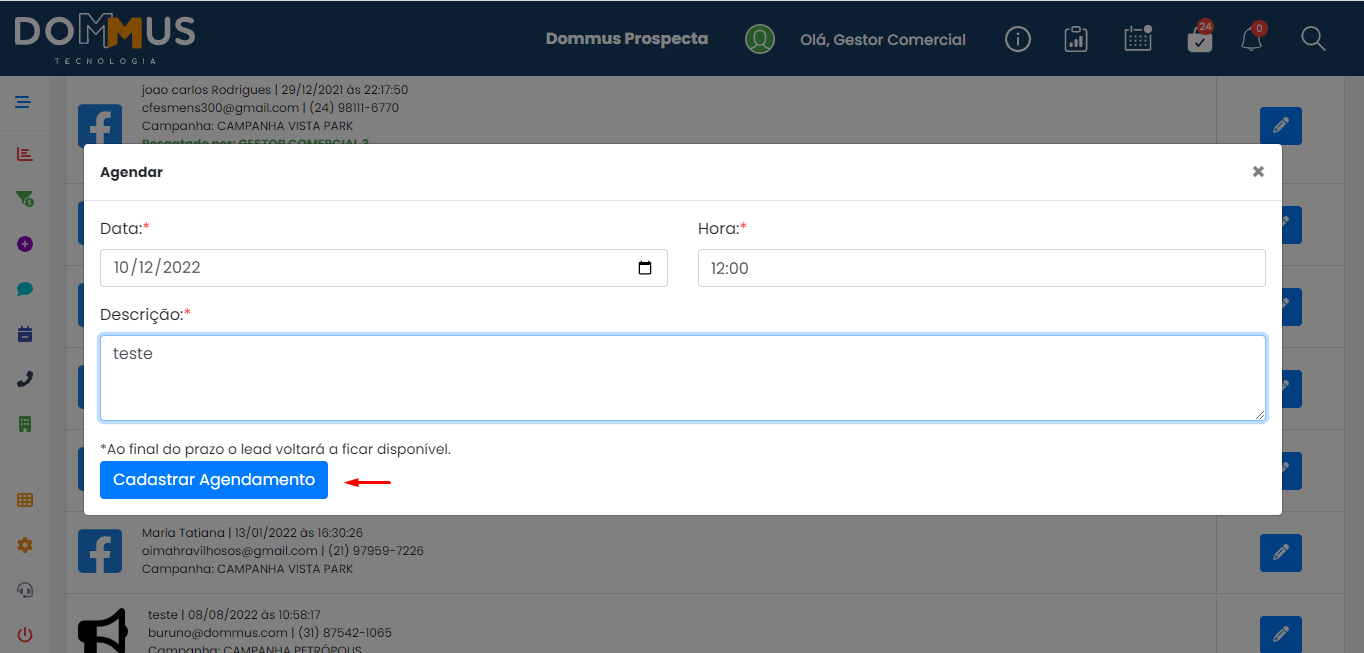
**Agendar**: insira a data, horário e uma descrição. Depois, clique em **Cadastrar Agendamento**.

[![image.png](https://duvida.dommus.com.br/uploads/images/gallery/2025-07/scaled-1680-/13mimage.png)](https://duvida.dommus.com.br/uploads/images/gallery/2025-07/13mimage.png)