# 16. Relatórios


# Relatório Geral (Base Completa)

<div id="bkmrk-introdu%C3%A7%C3%A3o-o-relat%C3%B3r"><div class="flex h-svh w-screen flex-col"><div class="relative z-0 flex min-h-0 w-full flex-1"><div class="relative flex min-h-0 w-full flex-1"><div class="@container/main relative flex min-w-0 flex-1 flex-col -translate-y-[calc(env(safe-area-inset-bottom,0px)/2)] pt-[calc(env(safe-area-inset-bottom,0px)/2)]"><div class="@w-sm/main:[scrollbar-gutter:var(--stage-scroll-gutter)] touch:[scrollbar-width:none] group/scroll-root relative flex min-h-0 min-w-0 flex-1 flex-col [scrollbar-gutter:stable] not-print:overflow-x-clip not-print:overflow-y-auto group-data-stream-active/scroll-root:[overflow-anchor:none] scroll-pt-(--header-height) [--sticky-padding-top:var(--header-height)] [--sticky-padding-bottom:0px] [--scroll-root-safe-area-inset-top:calc(var(--sticky-padding-top)+env(safe-area-inset-top,0px))] [--scroll-root-safe-area-inset-bottom:calc(var(--sticky-padding-bottom)+var(--screen-keyboard-height,0px)+env(safe-area-inset-bottom,0px))] [--scroll-root-safe-area-height:calc(100lvh-var(--scroll-root-safe-area-inset-top)-var(--scroll-root-safe-area-inset-bottom))] has-data-[fixed-header=less-than-xl]:@w-xl/main:scroll-pt-0 has-data-[fixed-header=less-than-xl]:@w-xl/main:[--sticky-padding-top:0px] has-data-[fixed-header=less-than-xxl]:@w-2xl/main:scroll-pt-0 has-data-[fixed-header=less-than-xxl]:@w-2xl/main:[--sticky-padding-top:0px]" data-scroll-from-top="" data-scroll-root=""><main class="min-h-0 flex-1" id="bkmrk-introdu%C3%A7%C3%A3o-o-relat%C3%B3r-1"><div class="group/thread flex flex-col min-h-full" id="bkmrk-introdu%C3%A7%C3%A3o-o-relat%C3%B3r-2"><div class="composer-parent flex flex-1 flex-col focus-visible:outline-0" role="presentation"><div class="relative basis-auto flex-col -mb-(--composer-overlap-px) pb-(--composer-overlap-px) [--composer-overlap-px:28px] grow flex"><div class="flex flex-col text-sm"><section class="text-token-text-primary w-full focus:outline-none [--shadow-height:45px] has-data-writing-block:pointer-events-none has-data-writing-block:-mt-(--shadow-height) has-data-writing-block:pt-(--shadow-height) [&:has([data-writing-block])>*]:pointer-events-auto [content-visibility:auto] supports-[content-visibility:auto]:[contain-intrinsic-size:auto_100lvh] R6Vx5W_threadScrollVars scroll-mb-[calc(var(--scroll-root-safe-area-inset-bottom,0px)+var(--thread-response-height))] scroll-mt-[calc(var(--header-height)+min(200px,max(70px,20svh)))]" data-scroll-anchor="false" data-testid="conversation-turn-6" data-turn="assistant" data-turn-id="request-WEB:25c9743a-8f08-4c34-b007-842a2e4a67b3-2" dir="auto">#### Introdução

O Relatório Geral é um relatório completo que reúne todas as informações do processo dentro do módulo VENDE.

Ele serve para que você tenha uma visão ampla dos dados cadastrados, facilitando análises, conferências e controles.

Você deve utilizar esse relatório quando precisar extrair uma base completa de informações ou acompanhar dados de forma mais detalhada.

<div class="text-base my-auto mx-auto pb-10 [--thread-content-margin:var(--thread-content-margin-xs,calc(var(--spacing)*4))] @w-sm/main:[--thread-content-margin:var(--thread-content-margin-sm,calc(var(--spacing)*6))] @w-lg/main:[--thread-content-margin:var(--thread-content-margin-lg,calc(var(--spacing)*16))] px-(--thread-content-margin)"><div class="[--thread-content-max-width:40rem] @w-lg/main:[--thread-content-max-width:48rem] mx-auto max-w-(--thread-content-max-width) flex-1 group/turn-messages focus-visible:outline-hidden relative flex w-full min-w-0 flex-col agent-turn"><div class="flex max-w-full flex-col gap-4 grow"><div class="min-h-8 text-message relative flex w-full flex-col items-end gap-2 text-start break-words whitespace-normal outline-none keyboard-focused:focus-ring [.text-message+&]:mt-1" data-message-author-role="assistant" data-message-id="6f1d2d7c-9340-4675-a05b-e79f0aa284c0" data-message-model-slug="gpt-5-3" data-turn-start-message="true" dir="auto" tabindex="0"><div class="flex w-full flex-col gap-1 empty:hidden"><div class="markdown prose dark:prose-invert w-full wrap-break-word dark markdown-new-styling">---

</div></div></div></div></div></div>#### Como acessar

VENDE &gt; Lupa (Busca) &gt; Relatório de Base Completa

<div class="text-base my-auto mx-auto pb-10 [--thread-content-margin:var(--thread-content-margin-xs,calc(var(--spacing)*4))] @w-sm/main:[--thread-content-margin:var(--thread-content-margin-sm,calc(var(--spacing)*6))] @w-lg/main:[--thread-content-margin:var(--thread-content-margin-lg,calc(var(--spacing)*16))] px-(--thread-content-margin)"><div class="[--thread-content-max-width:40rem] @w-lg/main:[--thread-content-max-width:48rem] mx-auto max-w-(--thread-content-max-width) flex-1 group/turn-messages focus-visible:outline-hidden relative flex w-full min-w-0 flex-col agent-turn"><div class="flex max-w-full flex-col gap-4 grow"><div class="min-h-8 text-message relative flex w-full flex-col items-end gap-2 text-start break-words whitespace-normal outline-none keyboard-focused:focus-ring [.text-message+&]:mt-1" data-message-author-role="assistant" data-message-id="6f1d2d7c-9340-4675-a05b-e79f0aa284c0" data-message-model-slug="gpt-5-3" data-turn-start-message="true" dir="auto" tabindex="0"><div class="flex w-full flex-col gap-1 empty:hidden"><div class="markdown prose dark:prose-invert w-full wrap-break-word dark markdown-new-styling">---

</div></div></div></div></div></div>#### Como utilizar (passo a passo)

<div class="text-base my-auto mx-auto pb-10 [--thread-content-margin:var(--thread-content-margin-xs,calc(var(--spacing)*4))] @w-sm/main:[--thread-content-margin:var(--thread-content-margin-sm,calc(var(--spacing)*6))] @w-lg/main:[--thread-content-margin:var(--thread-content-margin-lg,calc(var(--spacing)*16))] px-(--thread-content-margin)"><div class="[--thread-content-max-width:40rem] @w-lg/main:[--thread-content-max-width:48rem] mx-auto max-w-(--thread-content-max-width) flex-1 group/turn-messages focus-visible:outline-hidden relative flex w-full min-w-0 flex-col agent-turn"><div class="flex max-w-full flex-col gap-4 grow"><div class="min-h-8 text-message relative flex w-full flex-col items-end gap-2 text-start break-words whitespace-normal outline-none keyboard-focused:focus-ring [.text-message+&]:mt-1" data-message-author-role="assistant" data-message-id="6f1d2d7c-9340-4675-a05b-e79f0aa284c0" data-message-model-slug="gpt-5-3" data-turn-start-message="true" dir="auto" tabindex="0"><div class="flex w-full flex-col gap-1 empty:hidden"><div class="markdown prose dark:prose-invert w-full wrap-break-word dark markdown-new-styling">1. Acesse o módulo VENDE
2. Clique no ícone da lupa (busca) [![image.png](https://duvida.dommus.com.br/uploads/images/gallery/2026-05/scaled-1680-/jWgimage.png)](https://duvida.dommus.com.br/uploads/images/gallery/2026-05/jWgimage.png)
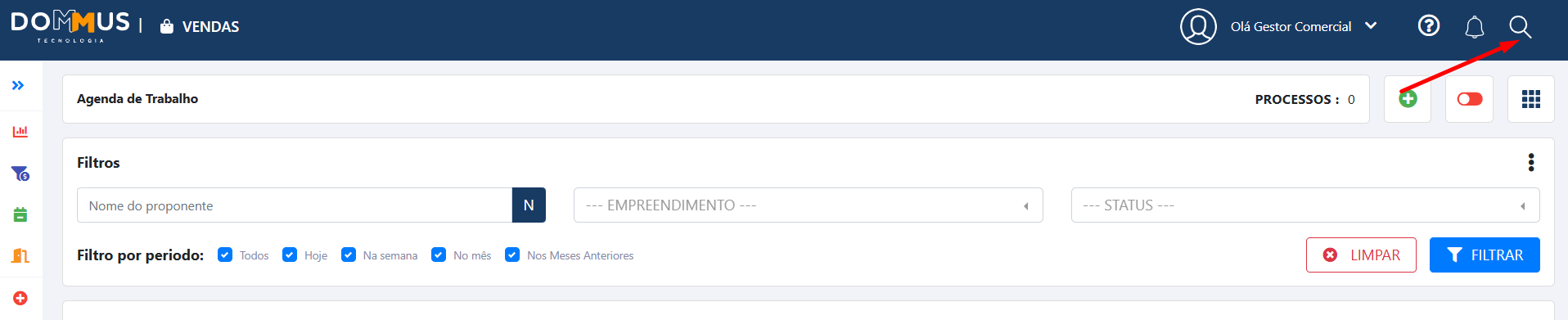
3. Realize uma busca (você pode buscar por todos os registros)
4. Após a busca, clique na opção **“Gerar relatório de base completa”,** posteriormente, na opção de **"Exportar Tabela"**[![image.png](https://duvida.dommus.com.br/uploads/images/gallery/2026-05/scaled-1680-/aDsimage.png)](https://duvida.dommus.com.br/uploads/images/gallery/2026-05/aDsimage.png)
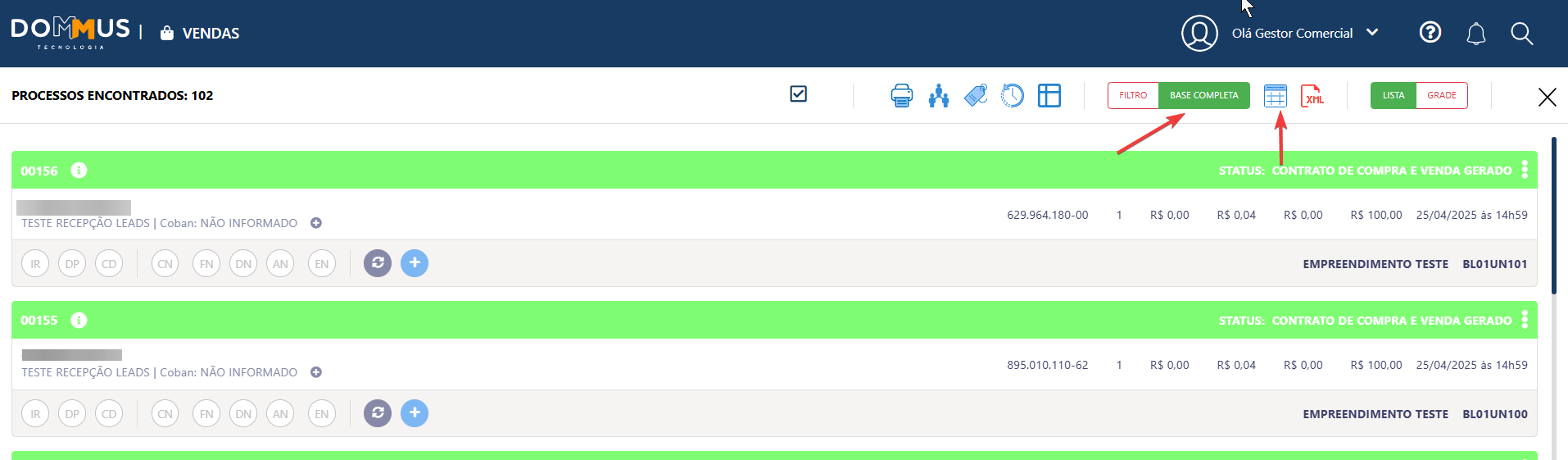
5. Selecione os campos que deseja incluir no relatório ou marque todos [![image.png](https://duvida.dommus.com.br/uploads/images/gallery/2026-05/scaled-1680-/bkgimage.png)](https://duvida.dommus.com.br/uploads/images/gallery/2026-05/bkgimage.png)
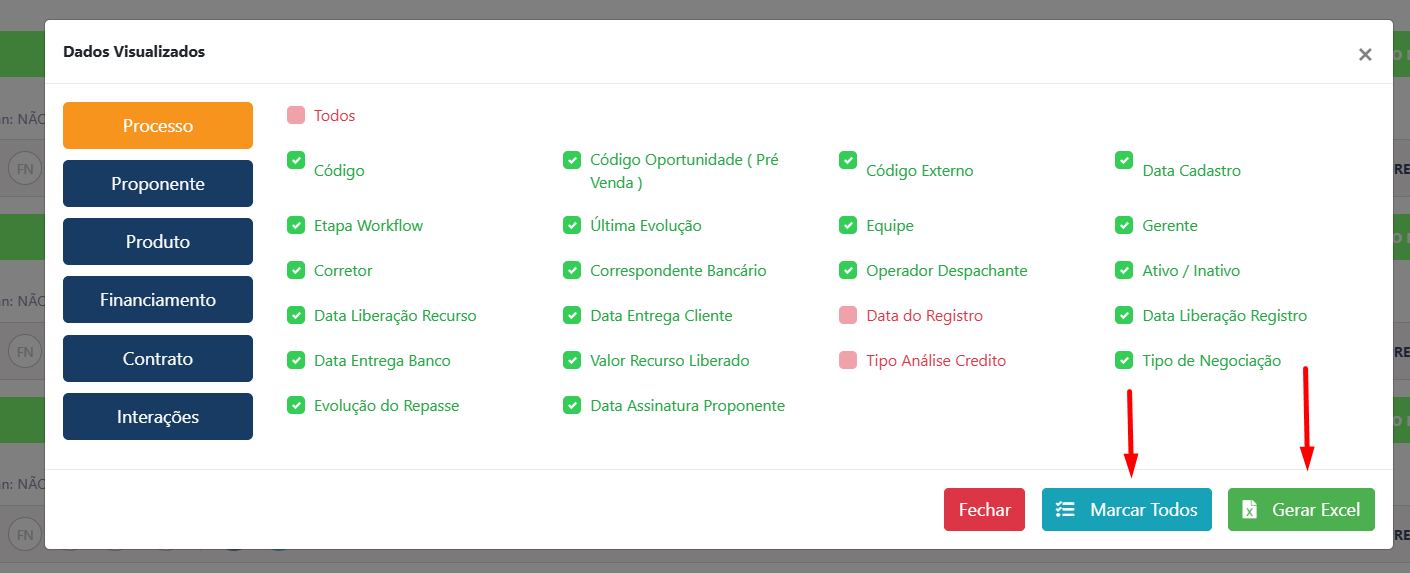
6. Confirme a geração do relatório

---

</div></div></div></div></div></div>#### Campos/Configurações

**Seleção de campos**

<div class="text-base my-auto mx-auto pb-10 [--thread-content-margin:var(--thread-content-margin-xs,calc(var(--spacing)*4))] @w-sm/main:[--thread-content-margin:var(--thread-content-margin-sm,calc(var(--spacing)*6))] @w-lg/main:[--thread-content-margin:var(--thread-content-margin-lg,calc(var(--spacing)*16))] px-(--thread-content-margin)"><div class="[--thread-content-max-width:40rem] @w-lg/main:[--thread-content-max-width:48rem] mx-auto max-w-(--thread-content-max-width) flex-1 group/turn-messages focus-visible:outline-hidden relative flex w-full min-w-0 flex-col agent-turn"><div class="flex max-w-full flex-col gap-4 grow"><div class="min-h-8 text-message relative flex w-full flex-col items-end gap-2 text-start break-words whitespace-normal outline-none keyboard-focused:focus-ring [.text-message+&]:mt-1" data-message-author-role="assistant" data-message-id="6f1d2d7c-9340-4675-a05b-e79f0aa284c0" data-message-model-slug="gpt-5-3" data-turn-start-message="true" dir="auto" tabindex="0"><div class="flex w-full flex-col gap-1 empty:hidden"><div class="markdown prose dark:prose-invert w-full wrap-break-word dark markdown-new-styling">- Permite escolher quais informações irão aparecer no relatório
- Você pode: 
    - Marcar todos os campos
    - Ou selecionar apenas os que deseja visualizar

---

</div></div></div></div></div></div>#### Pontos de atenção

<div class="text-base my-auto mx-auto pb-10 [--thread-content-margin:var(--thread-content-margin-xs,calc(var(--spacing)*4))] @w-sm/main:[--thread-content-margin:var(--thread-content-margin-sm,calc(var(--spacing)*6))] @w-lg/main:[--thread-content-margin:var(--thread-content-margin-lg,calc(var(--spacing)*16))] px-(--thread-content-margin)"><div class="[--thread-content-max-width:40rem] @w-lg/main:[--thread-content-max-width:48rem] mx-auto max-w-(--thread-content-max-width) flex-1 group/turn-messages focus-visible:outline-hidden relative flex w-full min-w-0 flex-col agent-turn"><div class="flex max-w-full flex-col gap-4 grow"><div class="min-h-8 text-message relative flex w-full flex-col items-end gap-2 text-start break-words whitespace-normal outline-none keyboard-focused:focus-ring [.text-message+&]:mt-1" data-message-author-role="assistant" data-message-id="6f1d2d7c-9340-4675-a05b-e79f0aa284c0" data-message-model-slug="gpt-5-3" data-turn-start-message="true" dir="auto" tabindex="0"><div class="flex w-full flex-col gap-1 empty:hidden"><div class="markdown prose dark:prose-invert w-full wrap-break-word dark markdown-new-styling">- O relatório é gerado em segundo plano, ou seja, não fica pronto na hora
- Quando estiver disponível, você será notificado pelo ícone do sino [![image.png](https://duvida.dommus.com.br/uploads/images/gallery/2026-05/scaled-1680-/Yfmimage.png)](https://duvida.dommus.com.br/uploads/images/gallery/2026-05/Yfmimage.png)
- <p class="callout warning">**Esse relatório pode sofrer alterações ao longo do tempo, pois novos campos podem ser adicionados ao sistema**</p>

---

</div></div></div></div></div></div>#### Resultado esperado

Após a geração, o relatório ficará disponível para download no sino de notificações.

Você terá acesso a um arquivo com todas as informações selecionadas, pronto para análise e uso conforme sua necessidade.

</section></div></div><div class="sticky bottom-0 z-10 group/thread-bottom-container relative isolate w-full basis-auto has-data-has-thread-error:pt-2 has-data-has-thread-error:[box-shadow:var(--sharp-edge-bottom-shadow)] md:border-transparent md:pt-0 dark:border-white/20 md:dark:border-transparent print:hidden content-fade single-line flex flex-col" id="bkmrk-"><div class="relative mx-auto h-0"></div><div id="bkmrk--1"><div><div class="text-base mx-auto [--thread-content-margin:var(--thread-content-margin-xs,calc(var(--spacing)*4))] @w-sm/main:[--thread-content-margin:var(--thread-content-margin-sm,calc(var(--spacing)*6))] @w-lg/main:[--thread-content-margin:var(--thread-content-margin-lg,calc(var(--spacing)*16))] px-(--thread-content-margin)"><div><div class="[--thread-content-max-width:40rem] @w-lg/main:[--thread-content-max-width:48rem] mx-auto max-w-(--thread-content-max-width) flex-1 mb-[var(--thread-component-gap,1rem)]"></div></div></div></div></div><div class="-mt-4 text-token-text-secondary relative w-full overflow-hidden text-center text-xs [view-transition-name:var(--vt-disclaimer)] md:px-[60px]"><div class="text-base mx-auto [--thread-content-margin:var(--thread-content-margin-xs,calc(var(--spacing)*4))] @w-sm/main:[--thread-content-margin:var(--thread-content-margin-sm,calc(var(--spacing)*6))] @w-lg/main:[--thread-content-margin:var(--thread-content-margin-lg,calc(var(--spacing)*16))] px-(--thread-content-margin)"></div></div></div></div></div></main></div></div></div></div></div></div><dialog class="group/dialog @container inset-0 min-h-full min-w-full whitespace-normal items-center justify-center overflow-auto overscroll-y-contain bg-[rgba(0,0,0,0.5)] backdrop-blur-[1px]"></dialog>